Coffee Codex - DNS Resolvers
Introduction
I’m at Belle Pastry in Bellevue, WA and today I’m learning about DNS resolvers. I think I know the basics of DNS in that it takes a url and recursively asks name servers if they know the IP address associated with that name, but I want to dive deeper. I also want to implement something in code without AI so I figured the first step in doing that is to learn deeply how a DNS resolver works.

How DNS works
Websites are identified with their IP addresses and not their human readable name so that way routers can have a hierarchical structure to route packets in a smart way.
An IP like 140.82.116.3 belongs to a larger IP range, such as 140.82.112.0/20, which routers can use to forward packets efficiently. But for humans, we like reading github.com and not an IP address.
When a DNS resolver receives a domain like github.com, it knows the IP of the root servers, of which there are 13 IP addresses managed by various organizations:
A - Verisign
B - USC / Information Sciences Institute
C - Cogent
D - University of Maryland
E - NASA
F - Internet Systems Consortium
G - U.S. Department of Defense
H - U.S. Army Research Lab
I - Netnod
J - Verisign
K - RIPE NCC
L - ICANN
M - WIDE Project
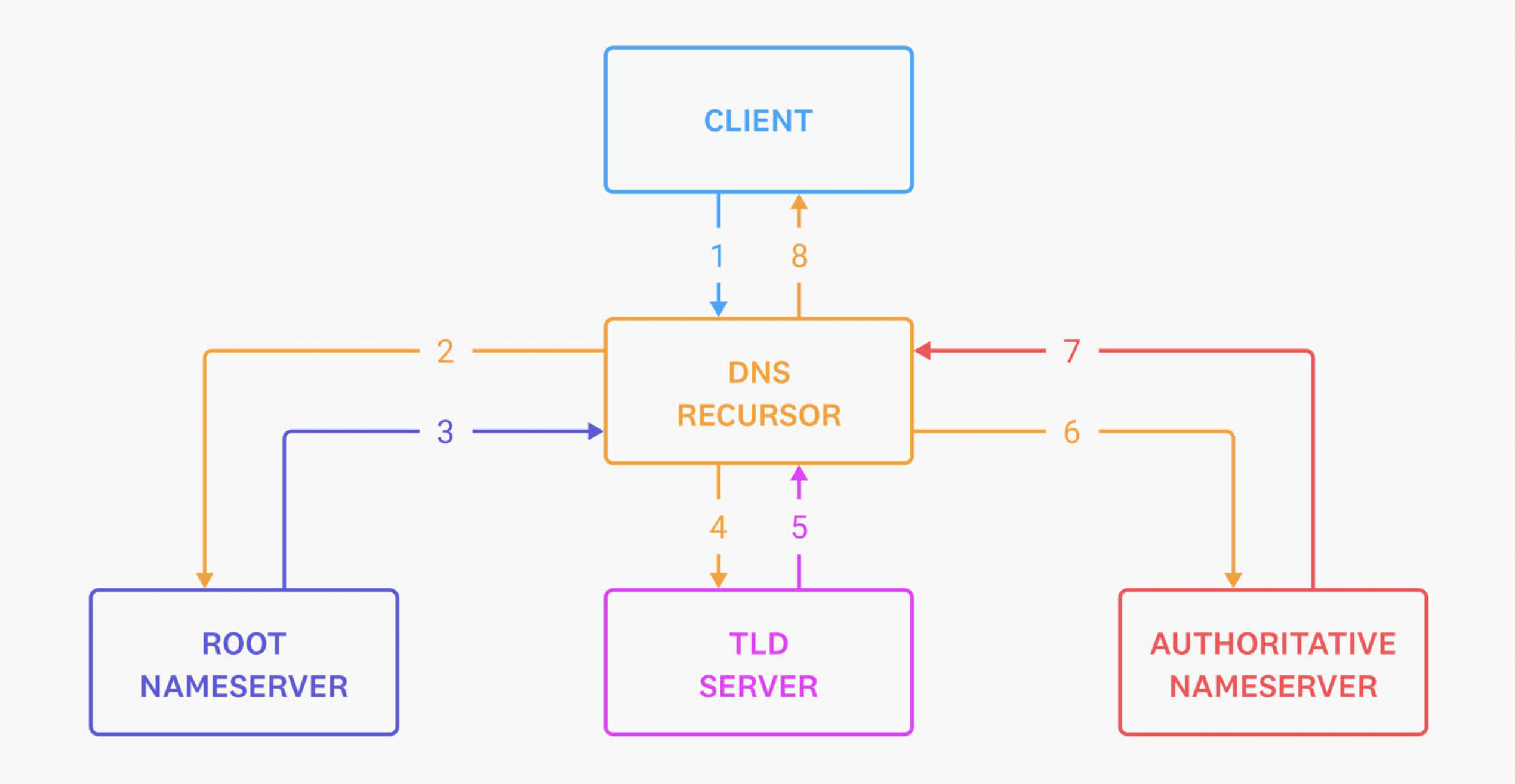
Even though there are 13 root server identities/IPs, each one is anycasted to many physical instances around the world. When we ask a root server about github.com, it returns the nameservers for the .com TLD.
Then we ask a .com TLD server about github.com. It returns the authoritative nameservers for github.com.
Then we ask one of those authoritative nameservers for the A record of github.com, and it returns the IP addresses for github.com.
Datadog has a good diagram of this
dig
Let’s try experimenting with dig
➜  ~ dig +trace github.com

; <<>> DiG 9.10.6 <<>> +trace github.com
;; global options: +cmd
.                       2694    IN      NS      a.root-servers.net.
.                       2694    IN      NS      b.root-servers.net.
.                       2694    IN      NS      c.root-servers.net.
.                       2694    IN      NS      d.root-servers.net.
.                       2694    IN      NS      e.root-servers.net.
.                       2694    IN      NS      f.root-servers.net.
.                       2694    IN      NS      g.root-servers.net.
.                       2694    IN      NS      h.root-servers.net.
.                       2694    IN      NS      i.root-servers.net.
.                       2694    IN      NS      j.root-servers.net.
.                       2694    IN      NS      k.root-servers.net.
.                       2694    IN      NS      l.root-servers.net.
.                       2694    IN      NS      m.root-servers.net.
;; Received 239 bytes from <local router> in 6 ms

com.                    172800  IN      NS      a.gtld-servers.net.
com.                    172800  IN      NS      b.gtld-servers.net.
com.                    172800  IN      NS      c.gtld-servers.net.
com.                    172800  IN      NS      d.gtld-servers.net.
com.                    172800  IN      NS      e.gtld-servers.net.
com.                    172800  IN      NS      f.gtld-servers.net.
com.                    172800  IN      NS      g.gtld-servers.net.
com.                    172800  IN      NS      h.gtld-servers.net.
com.                    172800  IN      NS      i.gtld-servers.net.
com.                    172800  IN      NS      j.gtld-servers.net.
com.                    172800  IN      NS      k.gtld-servers.net.
com.                    172800  IN      NS      l.gtld-servers.net.
com.                    172800  IN      NS      m.gtld-servers.net.
com.                    86400   IN      DS      19718 13 2 8ACBB0CD28F41250A80A491389424D341522D946B0DA0C0291F2D3D7 71D7805A
com.                    86400   IN      RRSIG   DS 8 1 86400 20260529170000 20260516160000 54393 . qJ/mCIqC02VDhOc6DmSnXQ+QVSAjND82GLnUS++3AkBqdmdlIHzExEyd /sGUlBLSKci7G4pvBtaG+MAJi2m/KfWG6z/AM6zDYzIHe1kTzhczf1m3 5wQXkx+2DY+GcLqzcjlKJpKnyGxmKNoY7KDDF+2EcloFnh3VAti8GOZ3 WeZsrGb371hY2zNzaaiZxBrJnyQHrztuAlZvy8IXGkMcOhHFS/vlCRkx BfZuJv6ShzHkTPCCg2HoyTLHv/63BOm9WpgeOryeHiIgevPqiA58Ap90 8AQILhA+T/gQ/ygUdNU7Gm6HXmLdU9DdDvATPDVCiAvh6n6RM31qSdpP A1QIEA==
;; Received 1170 bytes from 199.7.83.42#53(l.root-servers.net) in 91 ms

github.com.             172800  IN      NS      ns-520.awsdns-01.net.
github.com.             172800  IN      NS      ns-421.awsdns-52.com.
github.com.             172800  IN      NS      ns-1707.awsdns-21.co.uk.
github.com.             172800  IN      NS      ns-1283.awsdns-32.org.
github.com.             172800  IN      NS      dns1.p08.nsone.net.
github.com.             172800  IN      NS      dns2.p08.nsone.net.
github.com.             172800  IN      NS      dns3.p08.nsone.net.
github.com.             172800  IN      NS      dns4.p08.nsone.net.
CK0POJMG874LJREF7EFN8430QVIT8BSM.com. 900 IN NSEC3 1 1 0 - CK0Q3UDG8CEKKAE7RUKPGCT1DVSSH8LL  NS SOA RRSIG DNSKEY NSEC3PARAM
CK0POJMG874LJREF7EFN8430QVIT8BSM.com. 900 IN RRSIG NSEC3 13 2 900 20260522002629 20260514231629 27677 com. 4NrGuzOcoweHvSpzplYAnKaYtTl2uTrH+R/KNXuaKtvXqt5ceQcQEagO Guc0w3L7oTxlT2pWBbZjoTcf2NA+8w==
4KB4DFS71LEP8G8P8VT4CCUSQNL4CNCS.com. 900 IN NSEC3 1 1 0 - 4KB4V9IAMJL29MC1VBJ8NDO7E6SI2B8O  NS DS RRSIG
4KB4DFS71LEP8G8P8VT4CCUSQNL4CNCS.com. 900 IN RRSIG NSEC3 13 2 900 20260523023510 20260516012510 27677 com. QPcjxzkFhI8tanNI+5yWVLIcW+lYbvX2edaRfg31Ae8esA5EB0fcHkbA xGkfbSxuYHiLSKPD2rp5bqDJO+xQgQ==
;; Received 663 bytes from 2001:502:7094::30#53(j.gtld-servers.net) in 53 ms

github.com.             60      IN      A       140.82.116.3
;; Received 55 bytes from 2620:4d:4000:6259:7:8:0:1#53(dns1.p08.nsone.net) in 48 ms
dig stands for Domain Information Groper. When I run dig +trace github.com, it shows me how DNS was able to resolve github.com to its IP address.
So the first thing we do is query the root servers which are managed by those 13 organizations
name                    TTL     class   type    value
.                       2694    IN      NS      a.root-servers.net.
The . means we are at the DNS root. The 2694 is how long this record can be cached. The IN is the DNS class, which means Internet Record. There are alternatives like CH and HS but they are rare. The type is NS which means the value is a nameserver. And the value for the first record is a.root-servers.net, which is one of 13. The next 12 lines are the other 12.
We see Received 239 bytes from <local router> in 6 ms (I redacted the IP) which is the metadata for asking for the root name servers.
Once we have the root name servers, we can ask one of them for the .com TLD servers which return 13 starting with
name                    TTL     class   type    value
com.                    172800  IN      NS      a.gtld-servers.net.
These are the names of the .com nameservers, which are managed by Verisign who also chose to have 13 servers that get anycasted to hundreds. Notice how the value is not an IP address, but typically the servers will also return “glue” records in an additional records section which contain the IP for a.gtld-servers.net. In dig you can add +additional to see it.
In my case, I received that response from root server l
;; Received 1170 bytes from 199.7.83.42#53(l.root-servers.net) in 91 ms
These lines are for security (DNSSEC):
com.                    86400   IN      DS      19718 13 2 8ACBB0CD28F41250A80A491389424D341522D946B0DA0C0291F2D3D7 71D7805A
com.                    86400   IN      RRSIG   DS 8 1 86400 20260529170000 20260516160000 54393 . qJ/mCIqC02VDhOc6DmSnXQ+QVSAjND82GLnUS++3AkBqdmdlIHzExEyd /sGUlBLSKci7G4pvBtaG+MAJi2m/KfWG6z/AM6zDYzIHe1kTzhczf1m3 5wQXkx+2DY+GcLqzcjlKJpKnyGxmKNoY7KDDF+2EcloFnh3VAti8GOZ3 WeZsrGb371hY2zNzaaiZxBrJnyQHrztuAlZvy8IXGkMcOhHFS/vlCRkx BfZuJv6ShzHkTPCCg2HoyTLHv/63BOm9WpgeOryeHiIgevPqiA58Ap90 8AQILhA+T/gQ/ygUdNU7Gm6HXmLdU9DdDvATPDVCiAvh6n6RM31qSdpP A1QIEA==
It contains the cryptographic signing information and key for the response to make sure it was not tampered with. RRSIG DS 8 means this is a signature over the DS record, using DNSSEC algorithm 8, RSA/SHA-256. The DS record itself says .com uses algorithm 13 for its DNSSEC key.
Finally, we ask the TLD name servers (j.gtld-servers.net in this case) for the github.com records which are
github.com.             172800  IN      NS      ns-520.awsdns-01.net.
github.com.             172800  IN      NS      ns-421.awsdns-52.com.
github.com.             172800  IN      NS      ns-1707.awsdns-21.co.uk.
github.com.             172800  IN      NS      ns-1283.awsdns-32.org.
github.com.             172800  IN      NS      dns1.p08.nsone.net.
github.com.             172800  IN      NS      dns2.p08.nsone.net.
github.com.             172800  IN      NS      dns3.p08.nsone.net.
github.com.             172800  IN      NS      dns4.p08.nsone.net.
It looks like github uses 2 DNS providers: AWS (awsdns) and IBM (nsone). There are hundreds of companies that offer these including AWS Route 53, Cloudflare, Google Cloud, Microsoft Azure, Vercel, etc.
Finally we can ask one of these Authoritative nameservers for the IP for github. In this case, we ask IBM (dns1.p08.nsone.net)
github.com.             60      IN      A       140.82.116.3
;; Received 55 bytes from 2620:4d:4000:6259:7:8:0:1#53(dns1.p08.nsone.net) in 48 ms
And finally we have the A record which is the IPv4 address of github! Well at least for the next 60 seconds.
What I want to implement
Two popular public DNS resolvers are Cloudflare’s 1.1.1.1 and Google’s 8.8.8.8.
dig @1.1.1.1 github.com A

dig @8.8.8.8 github.com A
So we can ask either of those resolvers for the IP for a website and they will perform the resolution and return the IP address. I want to build that.