Coffee Codex - Kernel Firecracker
Introduction
I’m at Royal Bakehouse in Bellevue, WA and today I’m reading about how Kernel made Firecracker faster. I’ve written about Firecracker in the past and am a fan so this should be interesting.
Kernel
I haven’t heard of Kernel before, but it sounds like a cool company. I was very interested in unikernels a few years ago and it sounds like they also started by putting Chromium inside a unikernel. It seems like Kernel is the compute layer for AI agents to use the web. While unikernels are very cool, apparently it wasn’t good enough for them. They say that, even with Firecracker, the boot time is limited by disk read speeds on the host machine and the startup for Chromium is also multiple seconds.
Before reading on, this sounds a lot like the problem SnapStart in Lambda is meant to solve. I wonder if the solution they came to is snapshotting the memory of a computer with a fresh Chromium instance booted, and then “zapping” that into the memory of new machines. It seems like that should be possible given that the use cases for Kernel seem to be primarily Chromium automation.
Snapshotting
Oh there it is, the first thing Kernel considered is snapshotting. Interestingly, it’s not as simple as snapshotting after Chromium launches as I had thought. By waiting that long, every machine would have the exact same identity. So Kernel determined their “reusable standby point” which is the point where a fork could happen and the forked machine would have its own identity.
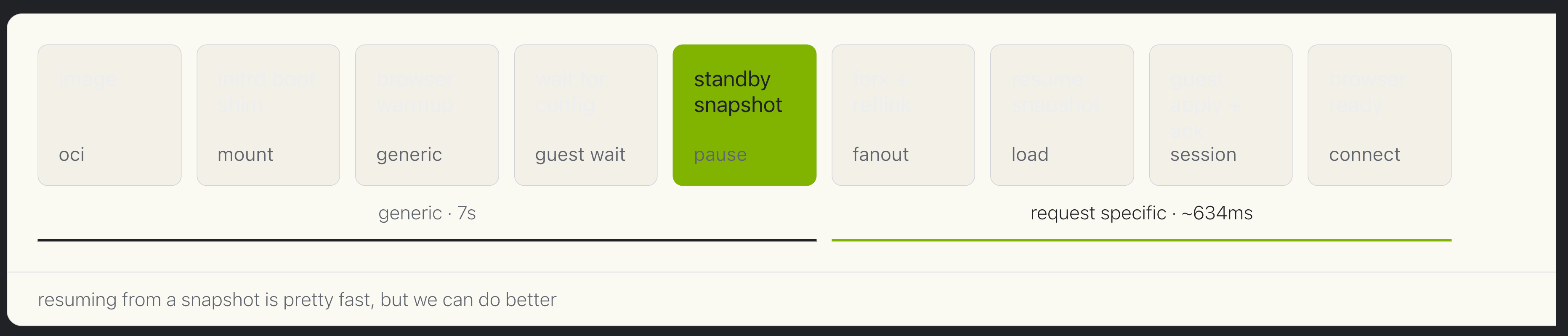 picture taken from their blog
In order, the steps mean:
- oci: unpack the user’s container image
- mount: initrd helper that runs before the filesystem is ready
- generic: I assume this is Chromium startup but not full boot
- guest wait: Once Chromium is almost ready but does not know the identity
- pause: Snapshot time Everything up until here takes ~7 seconds and is general so it can be snapshotted
- fanout: Fork the snapshot for each new VM
- load: Resume the snapshot process
- session: set session specific metadata, network info, etc
- connect: agents connect to Chromium
Of course this is all much more complex than a numbered list.
Copy-on-write
The next thing Kernel did was copy-on-write. When the forks are created from the snapshot, it wouldn’t make sense to physically copy every byte from the snapshot since the vast majority of them will stay the same throughout the lifetime of the VM. Instead, the process can continue to read from the snapshot disk until it needs to make a change. I’m not sure if they do the same thing for data in memory or if it’s only for disk. Regardless, the only time a copy of a page is needed is when a modification needs to be made, hence copy-on-write.
This is especially useful because forking from the snapshot means cloning both the overlay disk and guest memory. These can be large files, but the actual differences between the children should be small. So the base extents can be shared and only the changed blocks need to live in the child files. That means fanout is less scary from a disk I/O and storage perspective.
UFFD
After snapshotting and copy-on-write, the next bottleneck is loading the memory snapshot. Even if Firecracker can restore the VM quickly, the guest still needs memory pages from the snapshot file.
UFFD stands for userfaultfd, which lets userspace handle page faults. At first this sounds worse since userspace is not magically faster than the kernel. The benefit is that Kernel can avoid loading the whole memory snapshot up front. The VM can start, and when Chromium touches a missing page, the handler loads just that page from the snapshot.
The sharing part is not automatic from UFFD itself, but UFFD gives Kernel a place to build it. If many forked VMs touch the same Chromium pages, those hot pages can be cached and reused instead of every VM rereading them from disk. This makes startup depend more on the initial working set than the full snapshot size.
Hot pools
Even with all of this, the fastest cold start is still slower than already having a browser ready. So Kernel also has hot pools, which are sets of browsers already running and waiting for users.
When a request comes in, Kernel hands out one of these browsers and assigns it to the user’s account. They say this takes 10-30ms, and the user can connect to Chrome in under 80ms. This is basically avoiding the cold path rather than making the cold path faster.
The hard part is deciding how many browsers to keep hot. Too many wastes resources, too few means users fall back to the snapshot fork path. Kernel says they miss the hot pool around 1% of the time even under burst loads.
What’s next
With these optimizations, Kernel says they get under 20ms browser start times from the hot pool 99% of the time, and under 550ms for the other 1%. That’s a pretty big difference from “Chromium takes multiple seconds to start.”
They are also looking beyond Firecracker with Hypeman, GPU-accelerated browsers, and Cloud Hypervisor. I need to read more about Cloud Hypervisor.
Cool stuff!