Coffee Codex - Strands Box
Introduction
New post from Marc Brooker!
I’m at Royal Bakehouse in Bellevue, WA, and today I’m reading Strands Box to learn about what it is and how it differs from cloud sandboxes.

(I forgot to take a picture before drinking it, sorry)
Dogwood
Dogwood is a policy language created at AWS to make working with agents safer. How do you make it so every git push requires a successful npm test in the last 15 minutes, with no git add since? Or how do you make sure an agent doesn’t call the AWS MCP server over 60 times per hour? Of course you can politely ask your agent to, but that’s not very trustworthy. Instead, Dogwood lets you codify those rules so a policy engine can enforce them.
npm test example:
forbid (principal, action == Box::Action::"shell:spawn", resource)
    when { context.input.program == "git" && context.input has arg1 && context.input.arg1 == "push" }
    unless temporal {
       (!Box::Action::"shell:spawn"::response{ input.program: "git", input.arg1: "add" }
       since within 15m
       Box::Action::"shell:spawn"::response{ input.program: "npm", input.arg1: "test", input.arg_count: 1, input.cwd: "~/my-project", output.status: 0 })
    };
MCP example:
forbid (principal, action == Box::Action::"mcp:call", resource)
when { context.input.server == "aws" && context.input.method == "tools/call" }
when temporal {
  exists (n: Long). (
    (count for (t: Timepoint). where (
      formerly within 1h (
        Box::Action::"mcp:call"::request{ input.server: "aws", input.method: "tools/call" } && tp(t)
      )
    )) == n
    && n >= 60
  )
};
Not very readable in my opinion, but it gets the job done.
With Dogwood, calls can work like this and everyone is happy:
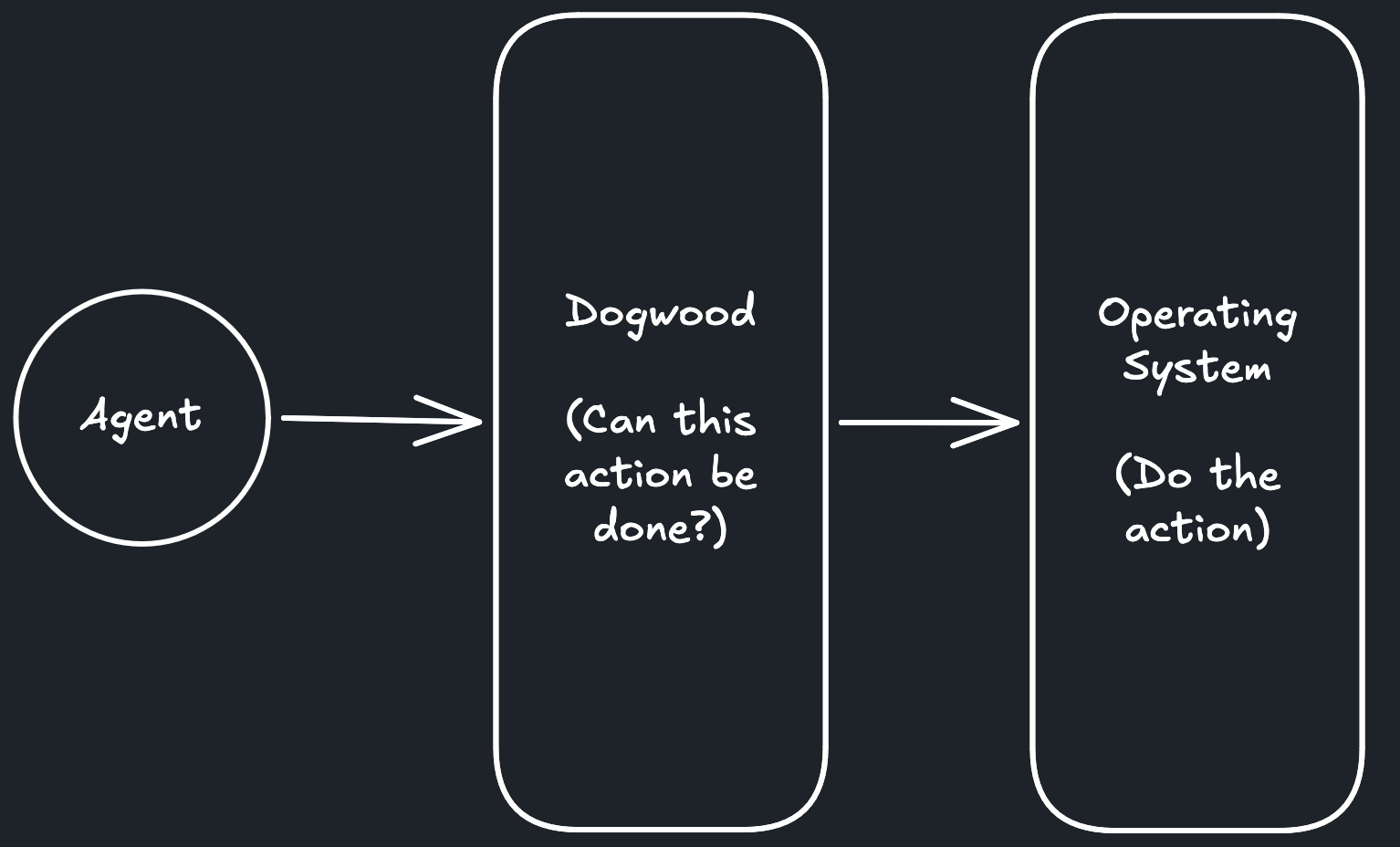
There’s just one problem: agents are kind of smart.
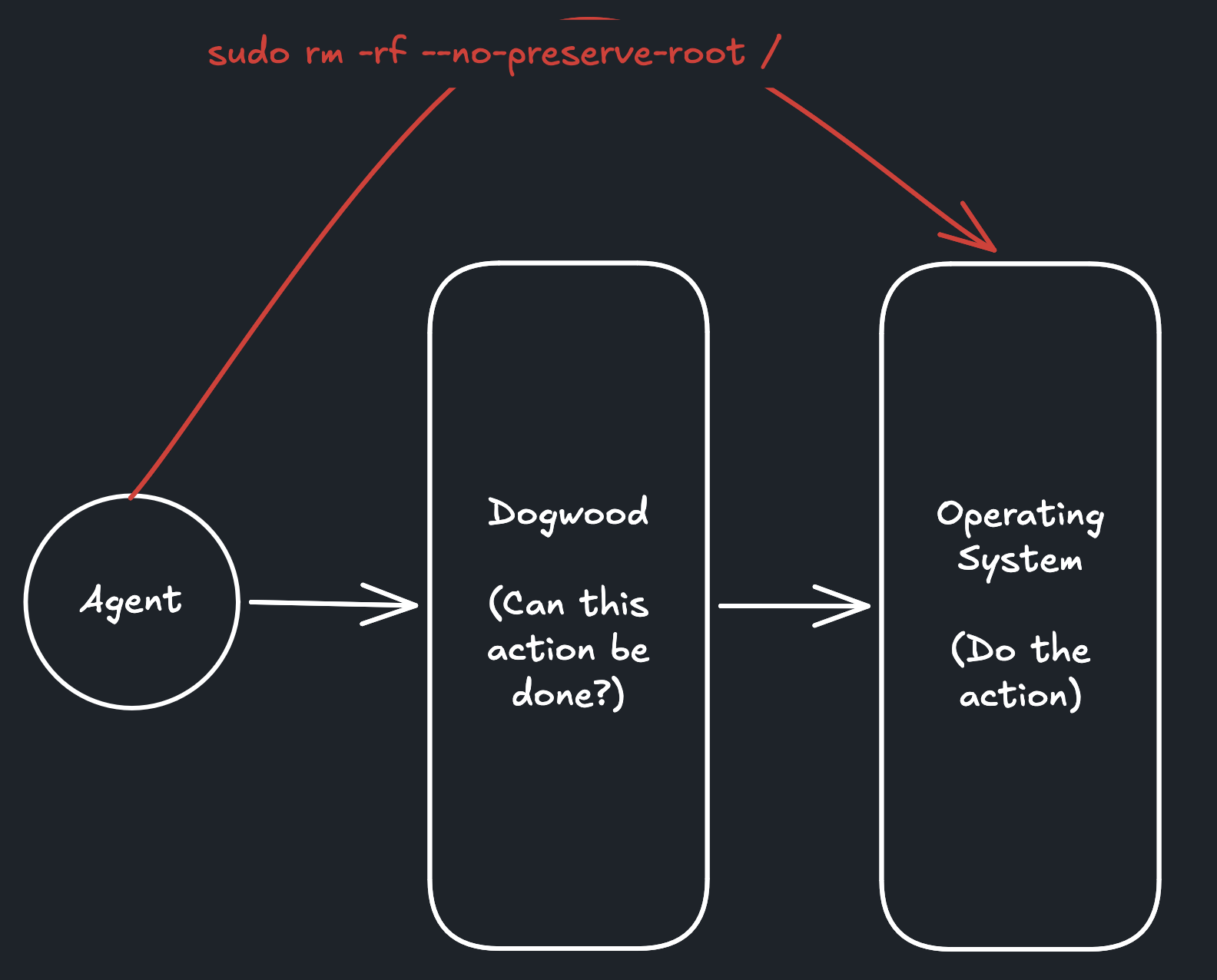
So what’s preventing an agent from bypassing this Dogwood policy layer entirely? So the question becomes “How do you make sure agents always go through the policy layer?”
Firecracker
I’ve written about Firecracker plenty of times in this blog, and I think it’s worth noting the distinction between microVM isolation (Firecracker) and action-level authorization (Dogwood).
Firecracker uses hardware virtualization to isolate a microVM, running its own guest kernel, from the host and other microVMs. It allows many isolated compute instances to run on one bare metal machine (e.g. Lambda). Strands Box and Firecracker are complementary. In fact, AWS recommends using both for multi-tenant cloud deployments. But they’re independent: you can run one without the other.
Let’s focus on the case where you are running Strands Box on your own development machine. I think that makes the examples simpler.
Enforcing the policy layer
Basically, we want to make sure there’s no way for an agent to access protected resources without going through the policy layer. Once there, Dogwood can decide whether to allow or deny the action.
Hardware-level
So can we enforce these rules at the hardware virtualization level? Like in Firecracker’s virtual network card or hard drive? Not really. The virtual network interface typically only sees packets containing TLS ciphertext, which you can’t easily inspect.
For example, imagine an agent making an HTTPS request to an AWS MCP server to delete an S3 bucket.
At the virtual network card level, you’re seeing packets containing encrypted TLS data. You might know the destination IP address, but you can’t easily tell whether the agent is listing S3 buckets or deleting one.
Dogwood needs to understand the actual MCP tool call to make that distinction.
The virtual block device often sees plaintext, but at that level it only sees reads and writes at specific byte offsets. You’d need to reconstruct what the guest OS is doing from those operations.
For example, imagine an agent running git push after making changes to a repository.
At the virtual hard drive level, you might see operations like:
read 4096 bytes at offset 8192
write 512 bytes at offset 16384
read 1024 bytes at offset 32768
You’d need to reconstruct what files those operations correspond to, what the OS was doing, and how that relates to the git command being executed. Even then, git push is primarily a network operation, so those disk reads and writes wouldn’t reliably tell you whether the push was allowed.
That’s a lot of work just to enforce a rule about running tests before pushing code, which also isn’t great.
Syscalls
So let’s move up to the operating system and specifically the syscall level. You can do a lot with syscalls since it’s semantically more clear what the user is doing.
openat(AT_FDCWD, "/home/user/.ssh/id_rsa", O_RDONLY);If there were a Dogwood policy to prevent reading ~/.ssh, this would be much more clear. Or even for accessing a port:
connect(fd, { IP: "1.2.3.4", port: 443 });
sendto(fd, encrypted_bytes, ...);
This works pretty well for a lot of cases, but not all. Like what if new syscalls are introduced? Do you default deny them? Or with MCP calls, do you intercept and look into requests, possibly rewriting them? Probably not; that would lead to timing issues. There are tradeoffs.
Strands Box’s approach
So Strands Box takes a different approach. Instead of trying to understand every syscall, it uses kernel-level isolation to restrict what the agent can access directly.
The Strands Box configuration file looks like this:
box.toml
[agent.filesystem]
read = ["/home/user/project"]
write = ["/home/user/project"]
It’s saying that the agent is allowed to read and write to /home/user/project.
For other operations that are not directly permitted, Strands Box has interfaces that consult the Dogwood policy layer.
From the blog, the full system looks like this:
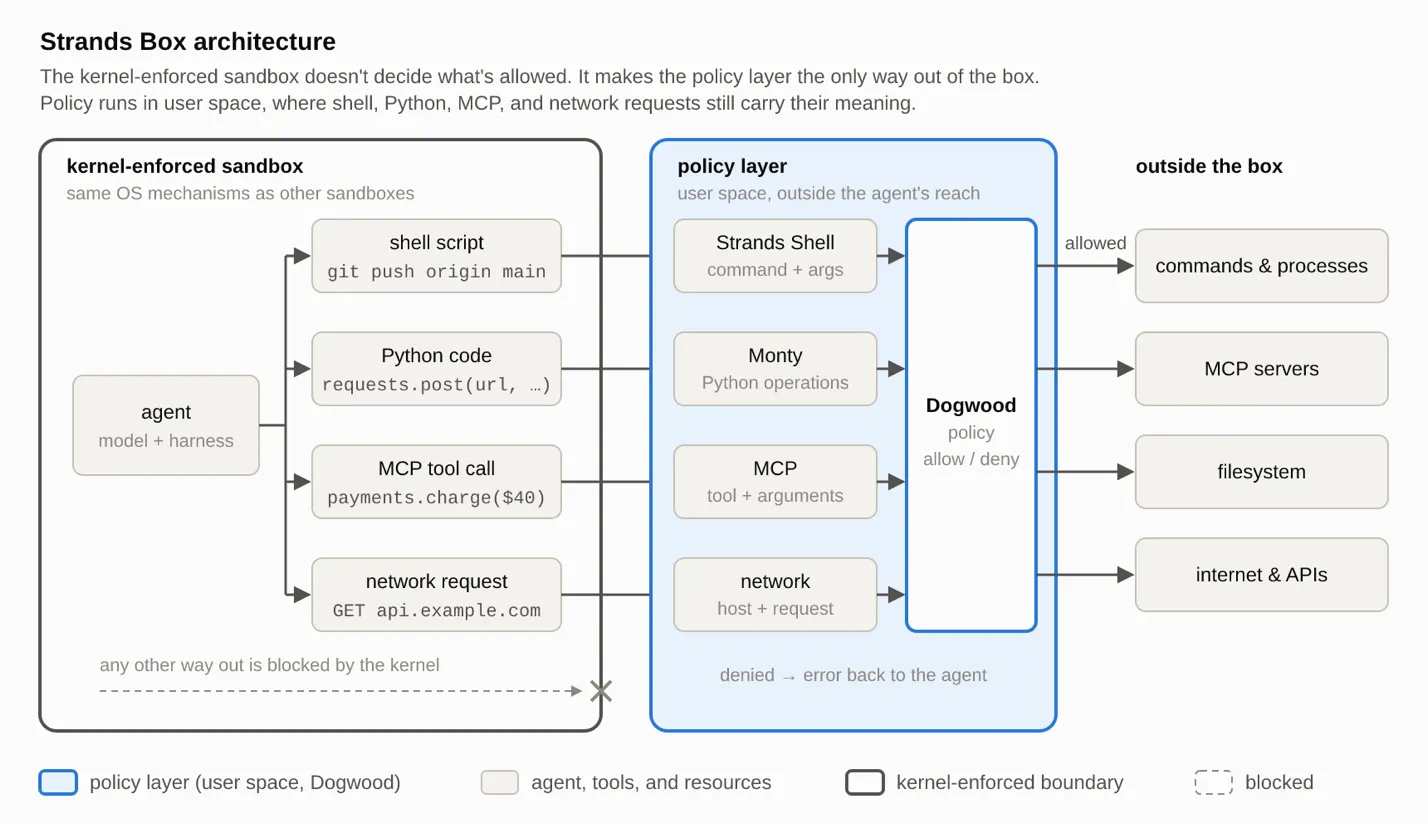 Diagram from Marc Brooker’s Strands Box: The Big Picture, published on Strands Agents.